
Cashless vs traditional vending machines is no longer a close debate. As of 2026, cashless payment has become the default in commercial vending — not a premium upgrade. Over 80% of vending transactions in the U.S. now occur through digital payment methods, according to industry data from PayRange and multiple 2026 payment systems analyses. Cash-only machines still operate in specific environments, but for most commercial locations, the question isn’t whether to go cashless — it’s how.
This guide covers the real differences between cashless and traditional vending machines: revenue impact, operating costs, retrofit options, and the specific situations where each approach still makes sense. Browse our smart vending machines for sale and commercial vending machines to compare current cashless-enabled options.
Key Takeaways
- ✅ Over 80% of U.S. vending transactions are now cashless — the shift has already happened
- ✅ Cashless customers spend 26% more per transaction on average than cash customers
- ✅ Cashless machines generate 15–35% higher revenue per machine at comparable locations
- ✅ Card processing fees (1.5–3%) are offset by higher average transaction values
- ✅ Most older machines can be retrofitted with a cashless reader for $150–$500
- ✅ Cash-only machines still work in specific low-tech or cash-preferred environments
Quick Comparison: Cashless vs Traditional Vending Machines
| Factor | Cashless Vending Machine | Traditional (Cash-Only) Machine |
|---|---|---|
| Payment accepted | Card, mobile wallet, contactless, NFC | Coins and bills only |
| Average transaction value | $2.24 | $1.78 |
| Revenue vs cash-only | 15–35% higher at most locations | Baseline |
| Processing fees | 1.5–3% per cashless transaction | None |
| Coin collection required | No (or minimal) | Yes — frequent collection needed |
| Sales data available | Yes — real-time transaction data | Limited — manual count only |
| Remote monitoring | Available on most cashless systems | Not available |
| Theft risk | Lower — less cash on-site | Higher — cash stored in machine |
| Upfront cost | Higher (new machine or retrofit) | Lower |
| Best for | Offices, schools, hospitals, modern locations | Older facilities, cash-preferred demographics |
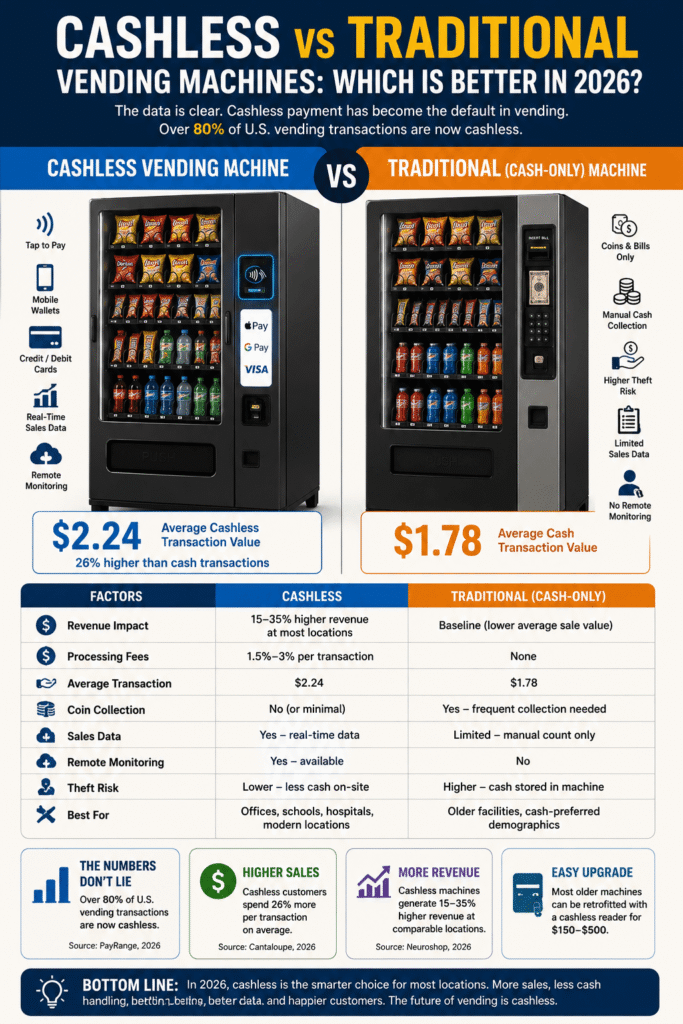
The Revenue Gap Is Real
The most important data point in the cashless vs traditional vending machines debate is transaction value. According to Cantaloupe’s research reported by PaymentsJournal, the average cashless vending transaction was $2.24 — compared to $1.78 for cash. That 26% difference compounds across every sale the machine makes.
Why do cashless customers spend more?
- No denomination friction. Cash customers are constrained by what’s in their wallet. A customer with only a $1 bill may skip a $1.50 item; a card user faces no such constraint.
- Reduced pain of payment. Digital payments reduce the psychological discomfort of spending compared to handing over physical cash — cashless buyers are less price-sensitive at the moment of purchase.
According to Neuroshop’s 2026 cashless comparison, cashless machines consistently generate 15–35% higher revenue than cash-only machines at comparable locations. At a machine generating $500/month on cash, that’s an additional $75–$175/month from switching to cashless — before accounting for reduced coin-handling labor.
What Does Cashless Cost the Operator?
The main cost of accepting cashless payments is the processing fee — typically 1.5–3% per transaction. On a $2.00 sale, that’s $0.03–$0.06 per transaction. At 300 cashless transactions per month, that’s $9–$18/month in processing fees.
The math is straightforward: the extra $0.46 per transaction from cashless more than covers a $0.06 processing fee. Other costs to factor in:
- Hardware — new machines include a reader at no additional cost. Retrofitting an existing machine costs $150–$500.
- Monthly connectivity fee — some systems charge $5–$15/month for cellular or WiFi connectivity. Others include this in the processing fee.
- Reduced coin handling — operators switching to cashless report significant time savings on coin collection, counting, and bank deposits.
Traditional Vending Machines: Where They Still Work
Cash-only machines have become the exception — but they’re not obsolete everywhere. According to VendAmerica’s June 2026 operator guide, cash-only machines still perform in specific situations:
- Older industrial facilities where the workforce skews older and cash is preferred
- Low-income areas where a significant portion of the customer base is unbanked
- Very low-traffic locations where retrofit ROI doesn’t justify the investment
- Locations with genuine cashless skepticism from the specific audience
- Machines near banks or ATMs where customers regularly have cash on hand
Retrofitting a Traditional Machine for Cashless
If you own a cash-only machine in good condition, retrofitting it with a cashless reader is often more economical than replacing the machine entirely. Most commercial machines built after 1995 include an MDB (Multi-Drop Bus) port — a standard interface that allows aftermarket cashless readers to be connected without modifying the machine’s core electronics.
Popular cashless retrofit options:
- Nayax — market-leading terminal, accepts card and mobile wallet, includes remote monitoring
- Cantaloupe (formerly USA Technologies) — widely used in commercial vending, strong data platform
- PayRange — mobile-payment focused, Bluetooth-based, works on most MDB-compatible machines
Retrofit cost typically runs $150–$500 for the hardware plus installation. Most systems are self-installable on MDB-compatible machines.
Which Should You Choose?
| If you… | Choose |
|---|---|
| Are buying a new machine in 2026 | Cashless — standard on virtually all new commercial machines |
| Have an older MDB-compatible machine | Retrofit with a cashless reader ($150–$500) |
| Are in an office, school, or hospital | Cashless — most buyers won’t carry cash |
| Are serving an older or cash-preferred workforce | Dual — accept both cash and cashless |
| Want real-time sales data and remote monitoring | Cashless — data requires digital payment infrastructure |
| Have a very low-traffic location | Evaluate retrofit ROI first — traditional may be sufficient |
The Best of Both: Dual-Payment Machines
Most current commercial vending machines accept both cash and cashless payment — they are not mutually exclusive. A machine with a bill validator, coin mechanism, and cashless reader covers every buyer regardless of their preferred payment method. This is the standard configuration on most new machines and the recommended retrofit approach for machines serving mixed audiences.
Going entirely cashless (removing cash acceptance) only makes sense in environments where you’re confident essentially no buyers use cash — which remains a small subset of locations even in 2026.
Cashless and Smart Vending
Cashless payment is the foundation of smart vending — you can’t have remote monitoring, real-time inventory data, or AI-powered management without digital payment infrastructure. If you’re considering upgrading to a coffee vending machine or any advanced connected machine, cashless capability comes standard and is the prerequisite for everything else the machine can do.
For operators currently running traditional machines who want to move toward smart vending, the practical upgrade path is: cashless reader first, then telemetry and remote monitoring, then AI features as the data builds up.
Bottom Line
In 2026, the cashless vs traditional vending machines debate has been settled by consumer behavior — cashless is the default. Over 80% of vending transactions are now digital, cashless customers spend 26% more per transaction on average, and virtually every new commercial machine ships with cashless as standard.
If you’re buying a new machine, choose one with cashless built in — it’s not an upgrade, it’s the baseline. If you own a traditional machine in good condition, a $150–$500 retrofit is almost always a positive-ROI investment at any location with meaningful foot traffic. The only strong case for cash-only in 2026 is a specific audience or environment where cash remains genuinely preferred.
Common Mistakes Operators Make
- Skipping cashless to avoid processing fees. Fees of 1.5–3% are consistently offset by the 26% higher average transaction value from cashless customers.
- Assuming their audience prefers cash. Unless there’s a specific reason to believe your location’s users are cash-preferred, the default assumption in 2026 should be that most buyers want to pay digitally.
- Going fully cashless without confirming the audience. Removing cash acceptance entirely before understanding your customer base risks alienating buyers who still rely on cash.
- Buying a used machine without checking MDB compatibility. Before purchasing a traditional machine with intent to retrofit, confirm it has an MDB port.
- Ignoring the data advantage of cashless. Real-time sales and inventory data from cashless systems tells you what’s selling, when, and at what price — enabling better restocking and pricing decisions.
Related Guides
- New vs Used Vending Machine — which to buy for your first placement
- Snack vs Combo Vending Machine — choosing the right machine type
- Do Vending Machines Need Electricity? — power requirements explained
- How Much Does It Cost to Stock a Vending Machine? — full operating cost breakdown
Frequently Asked Questions
What is the difference between cashless and traditional vending machines?
Traditional vending machines accept coins and bills only. Cashless vending machines accept credit and debit cards, mobile wallets, and contactless payment — and typically generate higher revenue because cashless customers spend 26% more per transaction on average.
Are cashless vending machines more profitable than traditional ones?
Yes, at most commercial locations. Cashless machines generate 15–35% higher revenue due to higher average transaction values and fewer missed sales. Processing fees of 1.5–3% are consistently offset by this revenue increase.
Can I add cashless payment to an existing vending machine?
Yes, if the machine has an MDB port — which most commercial machines built after 1995 do. A cashless reader retrofit typically costs $150–$500 and adds card, mobile wallet, and contactless payment capability.
Do cashless vending machines still accept cash?
Most do — the standard configuration accepts both cash and cashless payment. Going entirely cashless is only advisable in environments where you’re confident essentially no buyers use cash.
How much do cashless vending machine processing fees cost?
Typically 1.5–3% per cashless transaction. On a $2.00 sale that’s $0.03–$0.06 — consistently offset by the higher average transaction value cashless customers generate.
Is cashless vending worth it in 2026?
Yes — for virtually every commercial location. With over 80% of vending transactions now cashless and customers spending 26% more per digital transaction on average, the question isn’t whether cashless is worth it but how quickly to make the switch.
Looking for a cashless-enabled machine? Browse our snack vending machines, drink vending machines, and used vending machines for sale — or contact MapleVend to discuss which cashless configuration fits your location.
