
How to buy a used vending machine is one of the most practical questions a new operator faces — and getting it right means the difference between a machine that pays for itself in under a year and one that sits broken in a storage unit after a $600 compressor repair you didn’t see coming. Used machines cost 40–60% less than new equivalents and represent the most popular first purchase in commercial vending, but the used market has real risks that a structured buying process can avoid.
This guide walks through every step: what to look for, where to buy, what to inspect, and what to pay. Browse our used vending machines for sale to compare current options from a verified commercial supplier.
Key Takeaways
- ✅ Used machines cost $1,200–$3,000 — roughly half the price of a comparable new unit
- ✅ Four components determine whether a used machine is actually a good deal
- ✅ Parts availability is the most overlooked check — a discontinued model is a liability
- ✅ MDB compatibility is essential if you want to add cashless payment capability
- ✅ A $1,500 machine needing a $600 compressor and $300 card reader isn’t a bargain
- ✅ Buying from a reputable supplier beats private listings on risk-adjusted terms
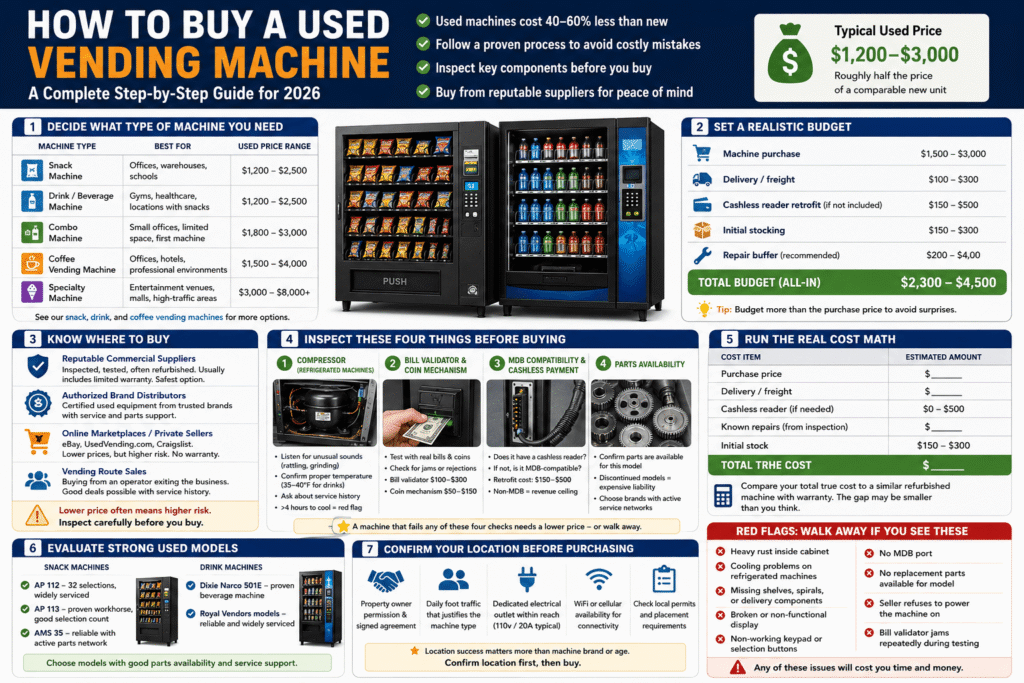
Step 1 — Decide What Type of Machine You Need
Before searching for a used machine, know what you’re looking for. The right machine type depends on your location and audience — not on what happens to be available at a good price.
| Machine Type | Best For | Used Price Range |
|---|---|---|
| Snack machine | Offices, warehouses, schools — food-focused locations | $1,200–$2,500 |
| Drink / beverage machine | Gyms, healthcare, locations with existing snack options | $1,200–$2,500 |
| Combo machine | Small offices, limited space, first machine | $1,800–$3,000 |
| Coffee vending machine | Offices, hotels, professional environments | $1,500–$4,000 |
| Specialty machine (ice cream, pizza, cotton candy) | Entertainment venues, malls, high-traffic locations | $3,000–$8,000+ |
Browse our full range of snack vending machines, drink vending machines, and coffee vending machines to compare available options by category.
Step 2 — Set a Realistic Budget
Your budget for a used machine should cover more than just the purchase price. A complete budget for a first used machine typically includes:
- Machine purchase: $1,500–$3,000 for a standard used snack or drink machine
- Delivery / freight: $100–$300 depending on distance and whether liftgate service is needed
- Cashless reader retrofit (if not already equipped): $150–$500
- Initial stocking: $150–$300 for a standard snack machine
- Repair buffer: $200–$400 — set this aside even if the machine inspects well
Total realistic budget for a first used snack or combo machine: $2,300–$4,500 all-in. Operators who budget only for the purchase price and get hit with a repair in the first 90 days often conclude the vending business doesn’t work — when the actual issue was inadequate budget planning.
Step 3 — Know Where to Buy
Where you buy a used vending machine affects your risk level as much as what you buy. The main channels in 2026:
Reputable commercial vending suppliers — the safest option. Machines have been inspected, tested, and often refurbished before listing. Usually includes a limited warranty and the ability to ask specific questions about condition. MapleVend’s used vending machines are commercial-grade equipment from established manufacturers.
Authorized brand distributors — strong option for specific brands. Dixie Narco, AP, AMS, Seaga, Royal Vendors, Jofemar, and Wittern all have authorized dealer networks that may carry certified used equipment. See our commercial vending machine categories for brand options.
Used equipment marketplaces (eBay, UsedVending.com, Craigslist) — larger selection, lower prices, but significantly higher risk. No inspection guarantee, no warranty, no recourse if the machine has hidden problems. Private sellers often list machines as “working” that haven’t been properly tested.
Vending route sales — buying machines from an operator who is exiting the business. Can be a good deal if the machines have a documented service history, but requires more due diligence than buying from a supplier.
Step 4 — Inspect These Four Things Before Buying
According to VendSoft’s 2026 used machine buying guide, four components determine whether a used vending machine is actually a good deal — or a liability disguised as a bargain:
1. Compressor (Refrigerated Machines Only)
The compressor is the most expensive component in a refrigerated drink or combo machine — replacement typically costs $300–$700 including labor. On inspection:
- Listen for unusual sounds (rattling, grinding, intermittent cycling)
- Confirm the machine reaches and holds proper temperature (35–40°F for drinks)
- Ask about compressor service history if the seller can provide it
- A machine that “seems to work” but takes 4+ hours to reach temperature is showing early compressor issues
2. Bill Validator and Coin Mechanism
Test both with real currency — multiple bills of different denominations and multiple coin types. A validator that jams, rejects bills repeatedly, or fails to register coins creates immediate customer frustration and lost revenue. Replacement bill validators run $100–$300; coin mechanisms run $50–$150.
3. MDB Compatibility and Cashless Payment
Most commercial machines built after 1995 include an MDB (Multi-Drop Bus) port that allows aftermarket cashless card readers to be connected. Confirm:
- Does the machine already have a working cashless reader?
- If not, is it MDB-compatible for retrofitting?
- What is the retrofit cost for the specific model?
A machine without cashless capability that isn’t MDB-compatible cannot be cost-effectively retrofitted — which means it has a structural revenue ceiling in any location where buyers don’t carry cash.
4. Parts Availability
This is the most commonly overlooked check. Confirm that replacement parts are still available for the specific model before purchasing. A $1,500 machine from a discontinued model line with no available parts is a time bomb — every component that fails becomes a major repair or machine replacement. Established brands with active service networks (AMS, AP, Seaga, Dixie Narco) have the best parts availability.
Step 5 — Run the Real Cost Math
Before committing to a used machine, run this quick calculation to confirm it’s actually a good deal:
| Cost Item | Estimated Amount |
|---|---|
| Purchase price | $_____ |
| Delivery / freight | $_____ |
| Cashless reader (if needed) | $0–$500 |
| Known repairs (from inspection) | $_____ |
| Initial stock | $150–$300 |
| Total true cost | $_____ |
Compare your total true cost against the price of a comparable refurbished machine with warranty from a reputable supplier. The gap may be smaller than you think — and the warranty protection is worth real money in the first year of operation.
Step 6 — Evaluate the Specific Models Available
Some used machine models hold up better than others. Here are strong choices in the used market with good parts availability and track records in commercial environments:
Snack machines:
- AP 112 — 32 selections, widely serviced, strong parts availability
- AP 113 — proven commercial workhorse, good selection count
- AMS 35 — reliable used snack machine with active parts network
Drink machines:
- Dixie Narco 501E — proven beverage machine, widely serviced, strong resale value
- Royal Vendors models — reliable cold drink machines with good commercial track records
Step 7 — Confirm Your Location Before Purchasing
The single most important variable in vending machine success is location — not machine brand, not machine age, not price. A $3,000 new machine in a bad location will underperform a $1,200 used machine in a strong one.
Before purchasing any machine — new or used — confirm:
- Property owner permission and a signed placement agreement
- Daily foot traffic that justifies the machine type
- A dedicated electrical outlet within reach of the planned location
- WiFi or cellular availability if the machine requires connectivity
For full guidance on placement rules and permit requirements, see our vending machine placement guide.
How Old Is Too Old? Machine Age Explained
Age alone isn’t a dealbreaker when buying a used vending machine. A well-maintained 12-year-old machine from a major manufacturer with active parts availability may be a better investment than a neglected 5-year-old machine with a failing compressor and no service history. What matters more than age:
- Service history — has the machine been regularly maintained or run until something breaks?
- Parts availability — are replacement parts still manufactured and available for this specific model?
- Compressor condition (refrigerated machines) — the compressor’s remaining life is more meaningful than the machine’s manufacture date
- Payment technology — older machines may lack MDB compatibility for cashless retrofitting, which limits their useful life regardless of mechanical condition
A practical guideline: machines from established manufacturers (AMS, AP, Dixie Narco, Seaga) built between 2005 and 2018 are generally in the sweet spot — old enough to be significantly discounted from new, but recent enough to have active parts networks and MDB compatibility. Machines older than 15–18 years start to carry meaningful parts availability risk on some components.
Red Flags: Walk Away If You See These
These are non-negotiable warning signs. If any of these appear during inspection, either walk away or negotiate a price that reflects the full cost of fixing the problem:
- 🚩 Heavy rust inside the cabinet — surface rust is cosmetic; structural rust indicates long-term neglect and potential electrical hazards
- 🚩 Cooling problems on refrigerated machines — takes more than 2 hours to reach temperature, or can’t hold temperature consistently
- 🚩 Missing shelves, spirals, or delivery components — replacement parts exist but add cost; confirm what’s missing before agreeing to a price
- 🚩 Broken or non-functional display — customers need to see selections and prices; a broken display is a customer experience failure from day one
- 🚩 Non-working keypad or selection buttons — fundamental to the machine’s operation; repair or replacement adds cost and downtime
- 🚩 No MDB port — the machine cannot be cost-effectively retrofitted for cashless payment, severely limiting its revenue potential in 2026
- 🚩 No replacement parts available for the model — every future repair becomes a major expense or machine replacement
- 🚩 Seller refuses to power the machine on — a working machine can always be powered up for inspection. Refusal is the clearest possible signal that something is wrong
- 🚩 Bill validator jams repeatedly during testing — chronic jamming drives customer frustration and lost sales; replacement validators run $100–$300
Common Mistakes When Buying a Used Vending Machine
- Buying based on price alone. A $900 machine that needs $800 in repairs before it can operate is a $1,700 machine — often more expensive than a cleaner used unit at $1,500 from a reputable supplier.
- Skipping the compressor check. On refrigerated machines, the compressor is the component most likely to fail and most expensive to replace. Never skip this inspection.
- Not confirming MDB compatibility. Before buying a used machine without a cashless reader, confirm it has an MDB port. Non-MDB machines can’t be cost-effectively retrofitted.
- Buying from a private seller with no inspection history. “Works great” in a Craigslist listing is not an inspection. If you can’t test the machine in person or get a verified inspection report, the risk is significantly higher.
- Not securing a location first. Buying a machine before confirming a placement means you might end up storing a vending machine while you look for somewhere to put it.
- Ignoring parts availability. Always check that replacement parts exist for the model before purchasing. One failed component on a discontinued machine can make the whole unit uneconomical to repair.
Related Guides
- New vs Used Vending Machine — full comparison of both options
- Vending Machine Leasing vs Buying — if you’re considering financing options
- How Much Does It Cost to Stock a Vending Machine? — ongoing operating costs
- Can You Put a Vending Machine Anywhere? — permits and placement rules
- Do Vending Machines Need Electricity? — power requirements before installation
Frequently Asked Questions
How to buy a used vending machine safely?
Buy from a reputable commercial supplier rather than a private seller, inspect the four key components (compressor, bill validator, MDB compatibility, parts availability) before purchasing, run the true total cost calculation including delivery and any needed repairs, and confirm your placement location before committing to a machine.
How much should I pay for a used vending machine?
Operator-grade used snack and drink machines typically run $1,200–$2,500. Professionally refurbished machines with updated payment hardware run $2,500–$3,500. Be cautious of machines priced below $1,000 — at that price point, hidden problems often make them more expensive than a properly inspected used machine at $1,500.
Where can I buy a used vending machine?
The safest sources are reputable commercial vending suppliers who inspect their machines before listing, and authorized brand distributors. UsedVending.com, eBay, and Craigslist offer more options at lower prices but require more due diligence since there’s no inspection guarantee or warranty.
What should I look for when buying a used vending machine?
Four things: the compressor (on refrigerated models), the bill validator and coin mechanism, MDB compatibility for cashless payment, and parts availability for the specific model. A machine that fails any of these checks needs to be priced to reflect the cost of the fix — or avoided entirely.
Is buying a used vending machine worth it?
Yes, for most first-time operators. The 40–60% cost savings vs new reduces financial risk on a first placement and shortens the payback period. The key is buying a properly inspected unit from a reputable source rather than an uninspected machine from a private seller.
Ready to buy a used vending machine? Browse our used vending machines for sale from established commercial manufacturers — or contact MapleVend to discuss which model fits your location, budget, and stocking needs.
