
Knowing how to clean a vending machine properly is one of the most underrated skills in vending operations. A clean machine sells more, lasts longer, and keeps location managers from replacing you with a competitor. According to Nayax’s April 2026 cleaning guide, a full deep clean should happen every three months — but high-contact areas like buttons, payment interfaces, and dispensing trays need attention every restock visit. This guide covers everything: what supplies to use, how to clean the exterior and interior safely, machine-type-specific steps for snack, drink, and combo machines, and a printable frequency schedule operators can follow on every service visit.
This guide was prepared by the MapleVend editorial team using manufacturer cleaning specifications, operator hygiene records, and 2026 commercial vending cleaning guides.
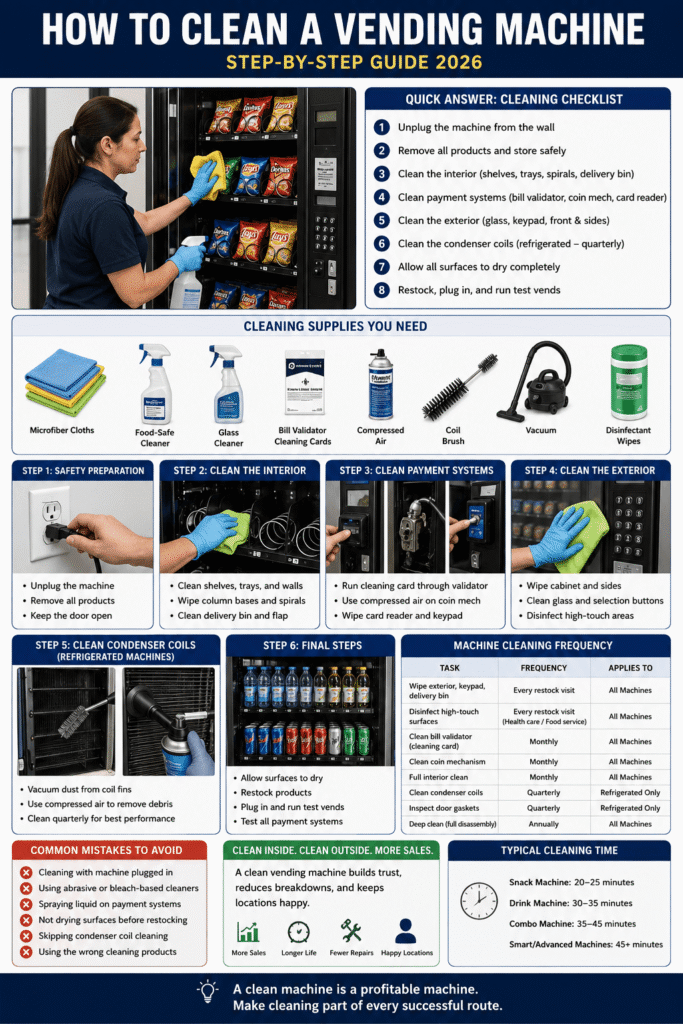
Quick Answer: How to Clean a Vending Machine
- Unplug the machine from the wall outlet
- Remove all products and store them safely
- Clean the interior — shelves, trays, spirals, and delivery bin
- Clean the payment systems — bill validator, coin mechanism, card reader
- Clean the exterior — front panel, glass, keypad, sides
- Clean the condenser coils (refrigerated machines — quarterly)
- Allow all surfaces to dry completely before restocking
- Plug back in, run test vends, confirm all systems working
Why Cleaning a Vending Machine Matters
Most operators underestimate how directly machine cleanliness affects revenue. Customers make split-second decisions about whether to buy from a machine based on its appearance. A sticky keypad, grimy glass, or visible crumbs in the delivery bin create doubt — and doubt means no sale. Beyond revenue, cleanliness affects:
- Machine performance. Dust on condenser coils forces compressors to work harder. Crumbs in column bases jam spirals. Product residue on sensors causes false sold-out readings. Physical cleanliness directly prevents mechanical problems.
- Location relationships. Location managers notice dirty machines. A machine that looks neglected reflects on the facility — and gives managers a reason to end your placement contract.
- Product hygiene. In food-service and healthcare environments, machine hygiene is a compliance issue, not just an aesthetic one.
- Machine lifespan. Clean machines experience less component wear, fewer jams, and longer intervals between repairs.
Cleaning Supplies You Need
| Supply | Used For | Notes |
|---|---|---|
| Microfiber cloths (4–6) | Exterior wiping, interior surfaces | Non-abrasive; doesn’t scratch glass or painted surfaces |
| Food-safe all-purpose cleaner | Interior shelves, trays, delivery bin | Must be food-safe — interior surfaces contact products |
| Glass cleaner | Front glass panel, display window | Streak-free formula for clear glass panels |
| Mild non-abrasive cleaner | Exterior cabinet surfaces | Avoid abrasive cleaners that scratch painted steel |
| Bill validator cleaning cards | Bill validator transport path | Available from vending parts suppliers — $1–$3 each |
| Compressed air canister | Coin mechanism, condenser coils, electronics | Never use liquid cleaners inside coin mechanisms or near electronics |
| Soft brush or condenser coil brush | Condenser coil fins (refrigerated machines) | Brush attachment on vacuum works well; dedicated coil brush is ideal |
| Vacuum with brush attachment | Condenser coils, interior debris removal | Small handheld vacuum works for interior; full-size for condenser access |
| Disinfectant wipes or spray | High-touch exterior surfaces: keypad, buttons, delivery bin handle | EPA-registered disinfectant — important for healthcare and food service locations |
| Bucket and warm water | Rinsing cloths, diluting cleaners | Change water when it becomes visibly dirty |
What NOT to use: Never use bleach-based cleaners on painted steel surfaces — they cause oxidation and discoloration. Never use liquid cleaners directly on electronics, payment systems, or the coin mechanism. Never use abrasive scrubbing pads on glass or front panels.
Step 1: Safety Preparation
- Unplug the machine from the wall outlet. This is non-negotiable before any interior cleaning. Water and electricity are a serious hazard — unplug before opening the door.
- Wait 2–3 minutes after unplugging before reaching inside — capacitors in the control board hold a residual charge briefly after power removal.
- Remove all products from the machine and store them in a clean, temperature-appropriate container. On refrigerated machines, products should not be left unrefrigerated for more than 20–30 minutes.
- Keep the machine door propped open throughout interior cleaning — never work inside a closed cabinet.
Step 2: Clean the Interior
Shelves and Product Trays
- Remove all shelf trays and coil assemblies where possible — consult your machine’s service manual for removal procedure
- Wipe each tray with a food-safe all-purpose cleaner and a damp microfiber cloth
- Pay particular attention to sticky residue from spilled products — use a slightly damp cloth and let the cleaner dwell for 30 seconds before wiping
- Rinse trays with a clean damp cloth to remove any cleaner residue
- Allow trays to air dry completely before reinstalling — or dry with a clean cloth
Column Bases and Spiral Coils
- Wipe down the base of each product column with a damp cloth to remove crumbs and debris
- Inspect each spiral coil for product residue, bent sections, or lodged product fragments
- Clean coil surfaces with a damp cloth — do not soak; the motors at the back of each coil must stay dry
- Use compressed air to blow debris from hard-to-reach column bases
Delivery Bin and Drop Zone
- The delivery bin is the most visible interior surface to customers — clean it thoroughly every visit
- Wipe all surfaces of the bin with a food-safe cleaner and disinfectant wipe
- Check for and remove any stuck products lodged in the delivery mechanism
- Wipe the delivery flap (if present) inside and out
Interior Cabinet Walls
- Wipe down interior walls with a damp microfiber cloth — top to bottom
- Pay attention to corners where condensation and debris accumulate
- On refrigerated machines, inspect interior walls for moisture or frost buildup — excessive frost indicates a door seal or defrost issue
Step 3: Clean the Payment Systems
Bill Validator
- Run a cleaning card through the validator — this removes dust and oils from the optical sensors and transport rollers that cause bill rejection
- Inspect the validator entry slot for debris or lodged bill fragments
- Wipe the exterior of the validator housing with a dry cloth — never use liquid cleaners on the validator itself
- Check the validator display (if present) for error codes before reinstalling products
Coin Mechanism
- Remove the coin mechanism from its housing (it slides or snaps out on most commercial machines)
- Use compressed air to blow debris from the coin path — never liquid cleaners
- Inspect coin entry slot and coin return for foreign objects
- Reinstall and test with multiple coin denominations before closing the machine
Cashless Card Reader
- Wipe the reader face and card slot area with a dry microfiber cloth
- For contactless readers, ensure the NFC surface is free of fingerprints and smudges that can interfere with tap payments
- Never spray liquid cleaners directly onto card readers — moisture damage to electronics is not covered by most warranties
- Power cycle the reader after cleaning (when machine is plugged back in) to confirm it reconnects normally
Step 4: Clean the Exterior
Front Panel and Cabinet
- Wipe the entire exterior cabinet surface with a mild non-abrasive cleaner on a microfiber cloth — top to bottom, sides included
- Use a glass cleaner on the front glass panel — spray onto the cloth, not directly onto the glass, to avoid overspray onto electronics
- Clean selection labels and button areas — these are high-touch and collect significant hand oils and dirt
- Wipe down the machine sides and top — these are often neglected but visible to location managers during inspections
- Clean the machine base and wheel casings if accessible
Keypad and Display
- Use disinfectant wipes on all keypads, selection buttons, and touchscreens — these are the highest-touch surfaces on the machine
- For touchscreen displays, use a screen-safe cleaner and microfiber cloth — avoid ammonia-based cleaners that damage anti-glare coatings
- Clean the payment interface area (card reader surround, bill entry surround) with a disinfectant wipe
Step 5: Condenser Coil Cleaning (Refrigerated Machines — Quarterly)
This step applies to cold drink machines and combo machines with refrigeration. It should be done every three months and is the single most impactful cleaning task for refrigerated machine performance and longevity.
- With the machine unplugged, locate the condenser coils — typically behind an access panel at the rear or bottom of the machine
- Use a vacuum with brush attachment to remove accumulated dust from the coil fins — work carefully to avoid bending the aluminum fins
- Follow with compressed air to remove fine dust from between coil fins
- Check that the condenser fan blade is free of debris and spins freely
- Replace the access panel and plug the machine back in
- Confirm the machine reaches target temperature (35–40°F) within 30 minutes of restart
Dirty condenser coils are the leading cause of premature compressor failure in commercial refrigerated vending machines. According to DFY Vending’s April 2026 cleaning guide, consistency is the key factor in keeping refrigeration systems healthy — quarterly coil cleaning without exception is the single highest-ROI cleaning task in the operator’s toolkit.
Step 6: Final Steps Before Returning to Service
- Allow all interior surfaces to dry completely before restocking — moisture inside a machine causes product damage and electrical issues
- Reinstall all trays and coil assemblies — confirm each column’s coil is properly seated and the set screw is tight
- Restock all products — check expiration dates before loading; discard any product that expired during the cleaning session
- Plug the machine back in and allow it to initialize fully before testing
- Run test vends on 3–4 columns — including any that had issues at the previous service visit
- Test all payment systems — bill validator with multiple denominations, coin mechanism, and card reader
- Confirm temperature display on refrigerated machines — should be reading within range within 15–30 minutes of power-on
How to Clean a Vending Machine by Type
How to Clean a Snack Vending Machine
Snack machines accumulate product dust, crumbs, and packaging debris more than any other machine type. Key snack-specific cleaning points: clean column bases with compressed air to remove crumb buildup; inspect every spiral for product residue that can cause jams; clean the delivery bin interior and flap thoroughly — this is where crumbs from the fall visibly accumulate. Monthly bill validator cleaning and monthly interior cleaning is the right frequency for most snack machine placements.
How to Clean a Drink Vending Machine
Drink machines require condenser coil cleaning quarterly as a non-negotiable addition to standard exterior and payment system cleaning. Interior cleaning on drink machines focuses on the product delivery channel and any tray or shelf surfaces that may have residue from leaking or damaged cans/bottles. Always inspect interior walls for condensation or frost buildup — excessive moisture indicates a door seal problem, not a cleaning issue. See our Dixie Narco and Royal Vendors reviews for model-specific access notes.
How to Clean a Combo Vending Machine
Combo machines combine the cleaning requirements of both snack and drink machines in a single unit. The snack section needs monthly interior cleaning and regular spiral inspection; the drink/refrigeration section needs quarterly condenser coil cleaning and door gasket inspection. Because combo machines have more internal complexity than dedicated units, allow extra time during cleaning visits — 30–45 minutes for a thorough clean vs 15–20 minutes for a dedicated snack machine.
Vending Machine Cleaning Frequency Guide
| Cleaning Task | Frequency | Machine Type | Time Required |
|---|---|---|---|
| Wipe exterior, keypad, delivery bin | Every restock visit | All | 5 minutes |
| Disinfect high-touch surfaces | Every restock visit (healthcare/food service) | All | 3–5 minutes |
| Clean bill validator (cleaning card) | Monthly | All | 5 minutes |
| Clean coin mechanism | Monthly | All | 10 minutes |
| Full interior clean (shelves, trays, columns) | Monthly | All | 20–30 minutes |
| Clean condenser coils | Quarterly | Refrigerated only | 15–20 minutes |
| Inspect and clean door gaskets | Quarterly | Refrigerated only | 10 minutes |
| Deep clean — full disassembly and clean | Annually | All | 60–90 minutes |
Common Cleaning Mistakes to Avoid
- Cleaning with the machine plugged in. Always unplug first — water and cleaning sprays near live electrical components are a serious safety hazard.
- Using abrasive cleaners on glass or painted surfaces. Scratched glass panels and faded paint make a machine look older and less professional. Use only non-abrasive cleaners on all exterior surfaces.
- Spraying liquid directly onto payment systems. Card readers, bill validators, and keypads are all vulnerable to moisture damage. Always spray cleaner onto a cloth first, then apply to the surface.
- Forgetting to dry interior surfaces before restocking. Damp shelves cause product packaging damage and create an environment for mold growth. Always allow surfaces to dry or wipe dry before loading products.
- Skipping condenser coil cleaning on refrigerated machines. This is the most commonly skipped task and the one with the highest cost consequence — dirty coils lead to compressor failure at a cost of $350–$900.
- Using the wrong cleaning products. Bleach-based cleaners damage painted steel. Ammonia damages touchscreen coatings. Always verify product compatibility with the surface you’re cleaning.
Related Guides
- Vending Machine Maintenance Guide — full preventative maintenance schedule
- How to Fix a Vending Machine — troubleshooting common problems
- How Long Do Vending Machines Last? — how cleaning affects machine lifespan
- New vs Used Vending Machine — what to inspect when buying used
Frequently Asked Questions
How often should you clean a vending machine?
High-touch surfaces — keypad, buttons, delivery bin — should be wiped down every restock visit. A full interior clean (shelves, trays, payment systems) should happen monthly. Condenser coils on refrigerated machines should be cleaned quarterly. A full deep clean should happen at least annually.
What do you use to clean a vending machine?
Food-safe all-purpose cleaner for interior surfaces, glass cleaner for front panels, mild non-abrasive cleaner for the exterior cabinet, disinfectant wipes for high-touch areas, bill validator cleaning cards for the validator, and compressed air for the coin mechanism and condenser coils. Never use bleach, ammonia, or abrasive cleaners on vending machine surfaces.
How do you clean the inside of a vending machine?
Unplug the machine, remove all products, then wipe shelves and trays with a food-safe cleaner. Clean the column bases and spiral coils with a damp cloth and compressed air. Wipe the delivery bin thoroughly. Allow all surfaces to dry completely before restocking. Run test vends after plugging back in to confirm everything is working correctly.
How do you clean vending machine condenser coils?
With the machine unplugged, locate the condenser coils behind the rear or bottom access panel. Vacuum dust from the coil fins with a brush attachment, then use compressed air to remove fine debris. Check that the condenser fan spins freely. Plug back in and confirm the machine reaches target temperature within 30 minutes. Clean quarterly on all refrigerated machines.
Does cleaning a vending machine increase sales?
Yes — a visibly clean machine generates more purchases than a dirty one at the same location. Customers make split-second trust decisions based on machine appearance, and a clean machine signals that the operator cares about product quality and customer experience. Clean bill validators and coin mechanisms also reduce payment rejection rates that directly cost sales.
Looking for commercial vending machines that are easy to clean and maintain? Browse our commercial vending machines for sale from established brands with simple, accessible designs — or contact MapleVend to discuss which machine fits your operation.
