
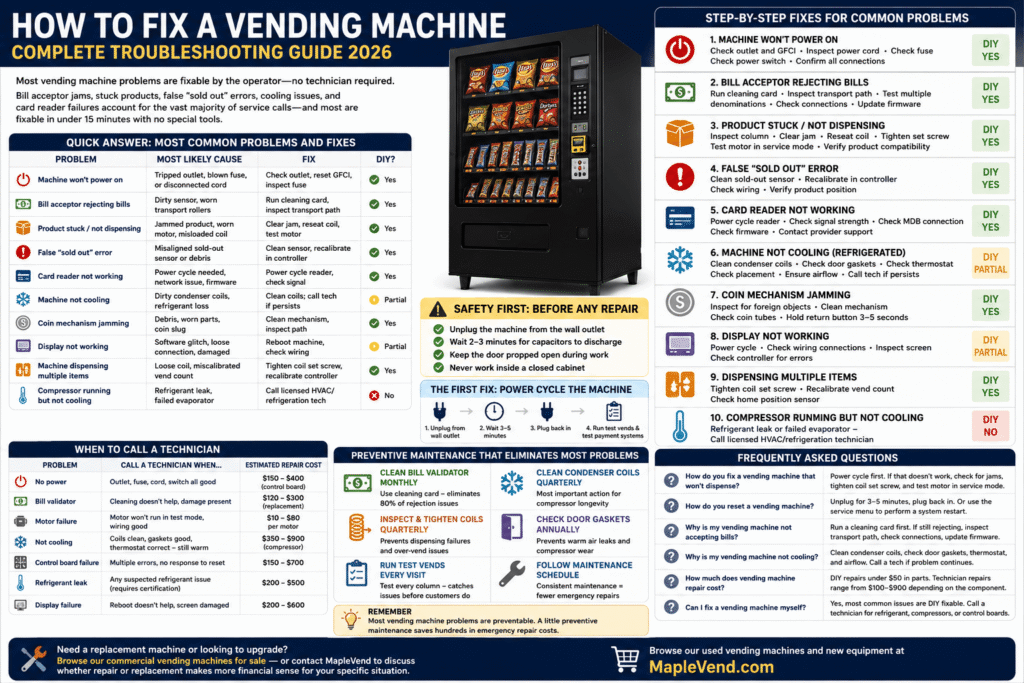
Knowing how to fix a vending machine is one of the most valuable skills a vending operator can have. Most vending machine problems are fixable by the operator — no technician required. According to Wendor’s June 2026 troubleshooting guide, bill acceptor jams, stuck products, false “sold out” errors, refrigeration faults, and card reader failures account for the vast majority of service calls — and most are fixable in under 15 minutes with no special tools. This guide covers every common vending machine problem, the specific fix that works, and when to call a technician instead of attempting the repair yourself.
Browse our used vending machines and new equipment if you’re evaluating whether repair or replacement makes more sense for your situation.
Quick Answer: Most Common Vending Machine Problems and Fixes
| Problem | Most Likely Cause | Fix | DIY? |
|---|---|---|---|
| Machine won’t power on | Tripped outlet, blown fuse, or disconnected cord | Check outlet, reset GFCI, inspect fuse | ✅ Yes |
| Bill acceptor rejecting bills | Dirty sensor, worn transport rollers | Run cleaning card, inspect transport path | ✅ Yes |
| Product stuck / not dispensing | Jammed product, worn motor, misloaded coil | Clear jam, reseat coil, test motor | ✅ Yes |
| False “sold out” error | Misaligned sold-out sensor or sensor debris | Clean sensor, recalibrate in controller | ✅ Yes |
| Card reader not working | Power cycle needed, network issue, firmware | Power cycle reader, check cellular signal | ✅ Yes |
| Machine not cooling | Dirty condenser coils, refrigerant loss, failed compressor | Clean coils; call technician if persists | ⚠️ Partial |
| Coin mechanism jamming | Debris, worn parts, coin slug | Clean mechanism, inspect for foreign objects | ✅ Yes |
| Display not working | Software glitch, loose connection, damaged screen | Reboot machine, check wiring connections | ⚠️ Partial |
| Machine dispensing multiple items | Loose coil, miscalibrated vend count | Tighten coil set screw, recalibrate controller | ✅ Yes |
| Compressor running but not cooling | Refrigerant leak, failed evaporator | Call licensed HVAC/refrigeration technician | ❌ No |
How to Fix a Vending Machine Safely: Before Any Repair
According to Engineer Fix’s troubleshooting guide, before attempting any internal inspection or repair, the machine must be completely disconnected from its power source. Unplug the main power cord from the wall outlet — this eliminates the risk of electrical shock during internal troubleshooting. For refrigerated machines, also allow 10–15 minutes after unplugging before working near the compressor or evaporator coils.
Three things to do before every repair attempt:
- Unplug the machine from the wall outlet
- Wait 2–3 minutes for capacitors to discharge
- Keep the machine door propped open during internal work — never work inside a closed cabinet
How to Fix a Vending Machine: Start With a Power Cycle
According to WebstaurantStore’s troubleshooting guide, the simplest way to reset a vending machine is to unplug it, wait a few minutes, then plug it back in. Many electronic errors — false sold-out readings, card reader failures, display glitches — clear themselves on a clean restart. Always attempt a power cycle before deeper diagnosis.
Power cycle procedure:
- Unplug from wall outlet
- Wait 3–5 minutes
- Plug back in
- Run 2–3 test vends across different columns
- Test bill acceptor with multiple denominations
- Test card reader with a card transaction
If the power cycle resolves the issue, complete a full machine inspection before returning it to service — the restart cleared the symptom, but the underlying cause may still be present.
Problem 1: Machine Won’t Power On
Symptoms
No display, no interior lighting, no response when buttons are pressed.
Diagnose and fix
- Check the wall outlet. Plug a phone charger or lamp into the same outlet. If it doesn’t work, the outlet is the problem — not the machine.
- Check for a tripped GFCI outlet. Many commercial locations use GFCI outlets in break rooms and food service areas. Press the reset button on the outlet itself.
- Inspect the power cord. Look for damage, pinching, or fraying along the full cord length. A damaged cord is a replacement item — do not tape and reuse.
- Check the machine’s internal fuse. Most commercial vending machines have a fuse holder near the power input. Consult your model’s service manual for location. Replace a blown fuse with the same amperage rating — never substitute a higher-amperage fuse.
- Check the main power switch. Many machines have a power switch near the cord input that can trip to an off position. Confirm it is in the ON position.
Call a technician if: outlet, GFCI, cord, fuse, and switch are all confirmed good but the machine still won’t power on. This indicates a failed control board or internal wiring fault.
Problem 2: Bill Acceptor Rejecting Bills
Symptoms
Bills are returned immediately, accepted then returned, or machine displays “Please use exact change.”
Diagnose and fix
- Clean the bill acceptor with a cleaning card. This is the fix for 80% of bill rejection issues. Run a cleaning card (available from vending parts suppliers for $1–$3) through the validator. The cleaning card removes dust, dirt, and oils from the transport rollers and optical sensors.
- Inspect the transport path. With power off, open the validator and look for debris, torn bill fragments, or foreign objects lodged in the transport path. Remove carefully with tweezers — never force.
- Test with multiple bill denominations. If only $5 bills are rejected, the issue may be a denomination-specific sensor calibration rather than general dirt.
- Check the validator’s connection to the control board. A loose harness connector between the validator and control board causes intermittent rejection issues that cleaning doesn’t fix.
- Check firmware version. Bill validators receive firmware updates to recognize new bill series. An outdated firmware may reject newer bills even with clean sensors. Check the validator manufacturer’s site for updates.
Call a technician if: cleaning and inspection don’t resolve the issue and the validator is physically damaged or water-damaged. Validator replacement costs $120–$300.
Problem 3: Product Stuck or Not Dispensing
Symptoms
Customer pays, motor sounds but nothing drops, or delivery is incomplete (partial product).
Diagnose and fix
- Open the machine and visually inspect the affected column. Look for products that have tipped sideways, expanded packaging that’s wedged, or items that fell behind the coil.
- Clear the jam manually. With power off, carefully remove jammed products. Reload the column ensuring products sit flat on the coil and are not packed too tightly.
- Reseat the coil on its drive shaft. According to Wendor’s 2026 guide, re-seating the coil on its drive shaft and tightening the set screw fixes many dispensing failures. A loose coil rotates without engaging the product properly.
- Test the column motor. With the machine powered on, run a manual vend test on the affected column (access through the service menu). If the motor runs but the coil doesn’t turn, the set screw is loose. If the motor doesn’t run at all, the motor may need replacement.
- Check for product size compatibility. Oversized products, unusually shaped packaging, or products that have swollen due to temperature can jam coils not designed for that item. Adjust product selection for the column width.
Call a technician if: the motor doesn’t respond in test mode and the wiring connection to the motor is secure. Motor replacement costs $10–$80 per motor depending on the brand and model.
Problem 4: False “Sold Out” Error
Symptoms
Machine displays “sold out” on columns that have product, or shows sold out immediately after restocking.
Diagnose and fix
- Clean the sold-out sensor. Most snack machines use an optical or mechanical sensor at the bottom of each column to detect whether product is present. Dust or debris on the sensor causes false readings. Clean with a dry cloth or compressed air.
- Recalibrate the sold-out sensor in the controller. Access the service menu and run the sold-out sensor calibration function. Consult your model’s service manual for the specific procedure — it varies by brand.
- Check sensor wiring. A loose wire to the sold-out sensor assembly causes intermittent false readings. Inspect the harness connection at the sensor and at the control board.
- Verify product loading. Some sensors require product to sit at a specific position in the column to register correctly. Ensure the bottom product in each column is properly seated against the sensor trigger point.
Problem 5: Card Reader Not Working
Symptoms
Card reader displays offline, doesn’t respond to tap or swipe, or declines all transactions.
Diagnose and fix
- Power cycle the card reader. Unplug the machine for 3–5 minutes, then power back on. Card readers (Cantaloupe ePort, Nayax VPOS Touch) often restore connectivity on a clean restart.
- Check cellular signal at the machine’s location. Most card readers use cellular connectivity. If the machine is in a basement, interior room, or metal-shielded location with poor signal, the reader may show online but fail to process transactions.
- Check the reader’s connection to the MDB port. The card reader connects to the machine via the MDB harness. A loose or corroded connection causes intermittent failures that look like reader problems but are actually connection issues.
- Check for firmware updates. Card reader manufacturers push firmware updates that address payment processing issues. Log into your reader’s management portal (Cantaloupe 365, Nayax IRIS) to check for pending updates.
- Contact the card reader provider’s support line. Cantaloupe and Nayax both have operator support lines. Many card reader issues are resolvable remotely by their support team without a technician visit.
Problem 6: Machine Not Cooling (Refrigerated Units)
Symptoms
Drinks not cold, interior temperature above 45°F, compressor running continuously or not running at all.
Diagnose and fix
- Clean the condenser coils. This is the most impactful maintenance action for refrigerated machines and the most commonly neglected. Dirty condenser coils force the compressor to work harder and can cause it to overheat and shut off. With power off, locate the condenser coils (typically at the back or bottom of the machine), and vacuum or brush accumulated dust and debris. Clean quarterly.
- Check door gaskets. A damaged or compressed door gasket allows warm air into the cabinet continuously, preventing the machine from reaching target temperature even with a functioning compressor. Press a dollar bill in the door and close — if it pulls out easily, the gasket isn’t sealing properly.
- Check the thermostat setting. Confirm the thermostat is set to the correct temperature range for your product type. A thermostat knocked to a warmer setting (or into defrost mode) is a common cause of “machine not cooling” calls that require no repair at all.
- Check machine placement. A machine placed in direct sunlight or against a wall with no airflow around the condenser can overheat regardless of coil cleanliness. Ensure at least 6 inches of clearance behind and around the machine.
Call a technician if: coils are clean, gaskets are good, thermostat is set correctly, and the machine still won’t hold temperature. This indicates refrigerant loss, a failed evaporator, or compressor failure — all require a licensed HVAC/refrigeration technician. Do not attempt refrigerant handling without certification.
Problem 7: Coin Mechanism Jamming
Symptoms
Coins returned immediately, coin jam error message, coins accepted but credit not added.
Diagnose and fix
- Inspect for foreign objects. Slugs, tokens, foreign coins, and debris are the most common cause of coin mechanism jams. With power off, remove the coin mechanism and inspect the coin path for anything that shouldn’t be there.
- Clean the coin mechanism. Dust and oil accumulation in the coin path causes intermittent rejections. Clean with compressed air and a dry brush — never use liquid cleaners inside the mechanism.
- Check the coin tube levels. If coin tubes are completely full, the mechanism may reject coins of that denomination even when functioning correctly. Empty the tubes and test.
- Hold the coin return button for 3–5 seconds. According to vPlaced’s 2026 troubleshooting guide, older mechanical validators sometimes need a sustained coin return signal (3–5 seconds held) rather than a single press to release a stuck refund relay.
Problem 8: Machine Dispensing Multiple Items Per Vend
Symptoms
Customer receives 2+ items when paying for one, or column runs through multiple products without stopping.
Diagnose and fix
- Tighten the coil set screw. A loose coil set screw allows the coil to slip on the drive shaft, causing it to over-rotate. Tighten the set screw with an Allen wrench — the correct size varies by brand, typically 3/32″ or 1/8″.
- Recalibrate the vend count in the machine controller. Wendor’s 2026 guide notes that the vend count can be recalibrated through the service menu if products are consistently dropping more than one item per vend cycle. Consult your model’s service manual for the procedure.
- Check the home position sensor. The motor should stop when the coil returns to the home position. A faulty home position sensor causes the motor to continue past the stop point. Inspect the sensor and its wiring connection.
When to Call a Technician
| Problem | Call a Technician When… | Estimated Repair Cost |
|---|---|---|
| No power | Outlet, fuse, cord, and switch all confirmed good | $150–$400 (control board) |
| Bill validator | Cleaning doesn’t help, physical damage present | $120–$300 (replacement) |
| Motor failure | Motor doesn’t run in test mode, wiring confirmed good | $10–$80 per motor |
| Not cooling | Coils clean, gaskets good, thermostat correct — still warm | $350–$900 (compressor) |
| Control board failure | Multiple unrelated errors simultaneously, no response to reset | $150–$700 |
| Refrigerant leak | Any suspected refrigerant issue — requires certification | $200–$500 |
| Display failure | Reboot doesn’t help, physical damage to screen | $200–$600 |
How to Fix a Vending Machine Before Problems Start: Preventive Maintenance
The majority of vending machine problems are preventable. Operators who follow a consistent maintenance schedule report significantly fewer emergency repairs than those who service reactively. See our full vending machine maintenance guide for a complete preventative schedule — but these are the highest-impact actions:
- Clean bill validator monthly with a cleaning card — eliminates 80% of rejection issues before they start
- Clean condenser coils quarterly (refrigerated machines) — the single most important action for compressor longevity
- Inspect and tighten coil set screws quarterly — prevents dispensing failures and over-vend issues
- Check door gaskets annually — a $40–$120 gasket replacement prevents far more expensive compressor wear
- Run test vends on every column every restock visit — catches motor and sensor issues before customers do
Related Guides
- How to Clean a Vending Machine — step-by-step cleaning guide
- AP Vending Machine Reviews — most durable snack machine for fewer repairs
- Dixie Narco Vending Machine Reviews — simple mechanical design, easy to repair
Frequently Asked Questions
How do you fix a vending machine that won’t dispense?
First, power cycle the machine (unplug 3–5 minutes, plug back in). If the problem persists, open the machine and inspect the affected column for jammed products, a loose coil set screw, or debris blocking the delivery path. Run a manual vend test through the service menu to isolate whether the issue is mechanical (coil/motor) or electronic (sensor/controller).
How do you reset a vending machine?
The simplest reset is a power cycle: unplug from the wall outlet, wait 3–5 minutes, and plug back in. For a controller reset, access the service menu (the key sequence varies by brand — consult your model’s service manual) and select the factory reset or system restart option. Always run test vends after any reset before returning the machine to service.
Why is my vending machine not accepting bills?
Bill rejection is caused by dirty sensors in 80% of cases. Run a cleaning card through the validator. If rejection continues, inspect the transport path for debris, check the harness connection between the validator and control board, and verify the firmware is current for your bill validator model.
Why is my vending machine not cooling?
The most common cause of cooling failure is dirty condenser coils forcing the compressor to overheat and shut down. Clean the condenser coils thoroughly. Also check the door gaskets for proper seal, confirm the thermostat is set correctly, and ensure the machine has adequate clearance for airflow. If cooling doesn’t restore after these steps, call a licensed refrigeration technician — refrigerant and compressor issues require certification to handle.
How much does vending machine repair cost?
Most DIY repairs (cleaning, coil tightening, fuse replacement) cost under $50 in parts. Technician-required repairs run $100–$900 depending on the component: validator replacement ($120–$300), motor replacement ($10–$80 each), control board ($150–$700), compressor ($350–$900). A machine requiring compressor replacement should be evaluated for replacement vs repair — see our repair vs replace framework.
Can I fix a vending machine myself?
Yes — most common problems are DIY fixable: bill validator cleaning, product jam clearing, coil tightening, power cycling, condenser coil cleaning, and door gasket inspection. Repairs requiring a technician are refrigerant handling, compressor replacement, and control board diagnosis when standard troubleshooting hasn’t identified the cause. When in doubt, call — a $100 technician visit is cheaper than a botched repair on a $400 control board.
Need a replacement machine or looking to upgrade? Browse our commercial vending machines for sale — or contact MapleVend to discuss whether repair or replacement makes more financial sense for your specific situation.
